

When you think about network security, you probably picture one thing. A firewall. Something blocking hackers on the other side of a wall.
That's one piece. There are eight layers in the model, and the firewall is the one least likely to be the reason you get breached, precisely because it's the one everybody configures.
Think about a bank. It doesn't lock the front door and call it done. There's a guard, a vault, cameras, an alarm, probably a second vault inside the first. Getting past one obstacle doesn't get you the money. You have to get past all of them.
So follow an attacker from the outside in and see what actually stops them at each stage.
One thing worth saying first, because it trips people up constantly: these eight are a control stack, not the OSI model's seven network layers. Some names overlap and the numbering does not match at all. When I say "the application layer" here, I mean the sixth barrier in this list, not OSI layer 7.
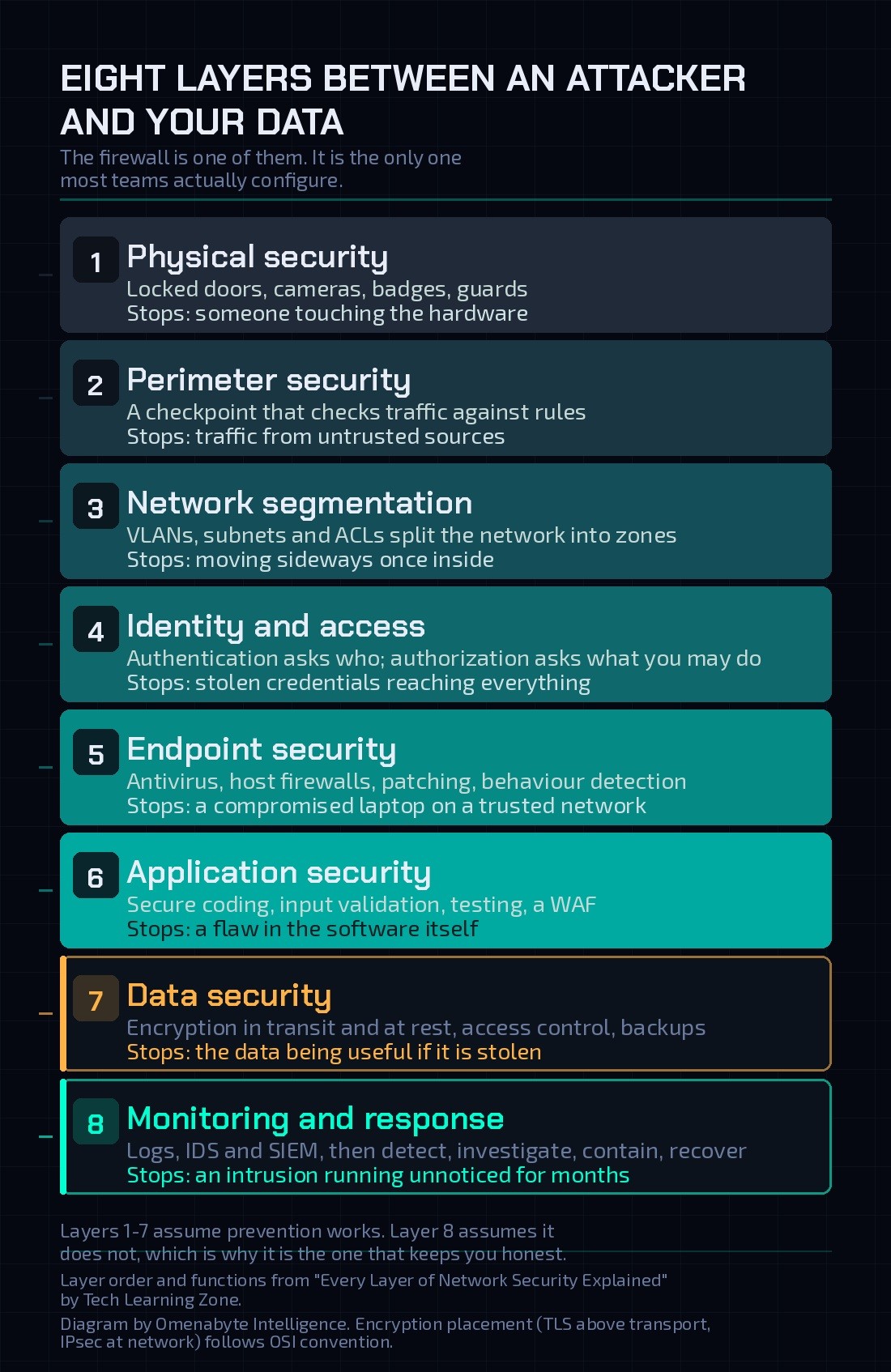
Layer 1: Physical security
Before firewalls or passwords, a simpler question. Can someone walk up and touch the hardware?
Locked doors, cameras, access badges, guards. All of it exists to stop someone plugging directly into a server or walking out with a drive under their arm. It sounds almost too obvious to mention, which is why it's the foundation everything else sits on. You can have the best firewall in the world, and if anyone can stroll into the server room, none of it matters.
Layer 2: Perimeter security
The network is physically protected, but attackers don't need to enter the building. They come through the connection.
This is the firewall, and the right mental model is a checkpoint rather than a wall. Every connection trying to enter or leave gets checked against rules. Some traffic is allowed. Some is blocked because it came from an untrusted source, used a restricted port, or failed the network's policy. A company might let employees browse the web while blocking unexpected inbound connections to internal servers.
Firewalls also police traffic between internal zones, not just between you and the internet. That matters for what comes next.
Layer 3: Network segmentation
An attacker got past the perimeter. Do they now have everything?
Only if your network is one flat space. Well-designed networks are broken into zones with VLANs, subnets and access control lists so different parts can't freely talk to each other. Employee laptops in one zone. Finance systems in another. Servers holding sensitive data in a third.
The payoff is specific. Compromising a single employee laptop doesn't hand an attacker a path to the database. Same logic as keycard doors inside a building: getting through the front entrance doesn't open every door.
This is where the model starts earning its keep, because it reframes what you're buying. Network security isn't only about keeping attackers out. It's about limiting what they can reach once they're in.
Layer 4: Identity and access
Controlling where someone can go isn't enough. You also need to know who they are and what they're allowed to touch.
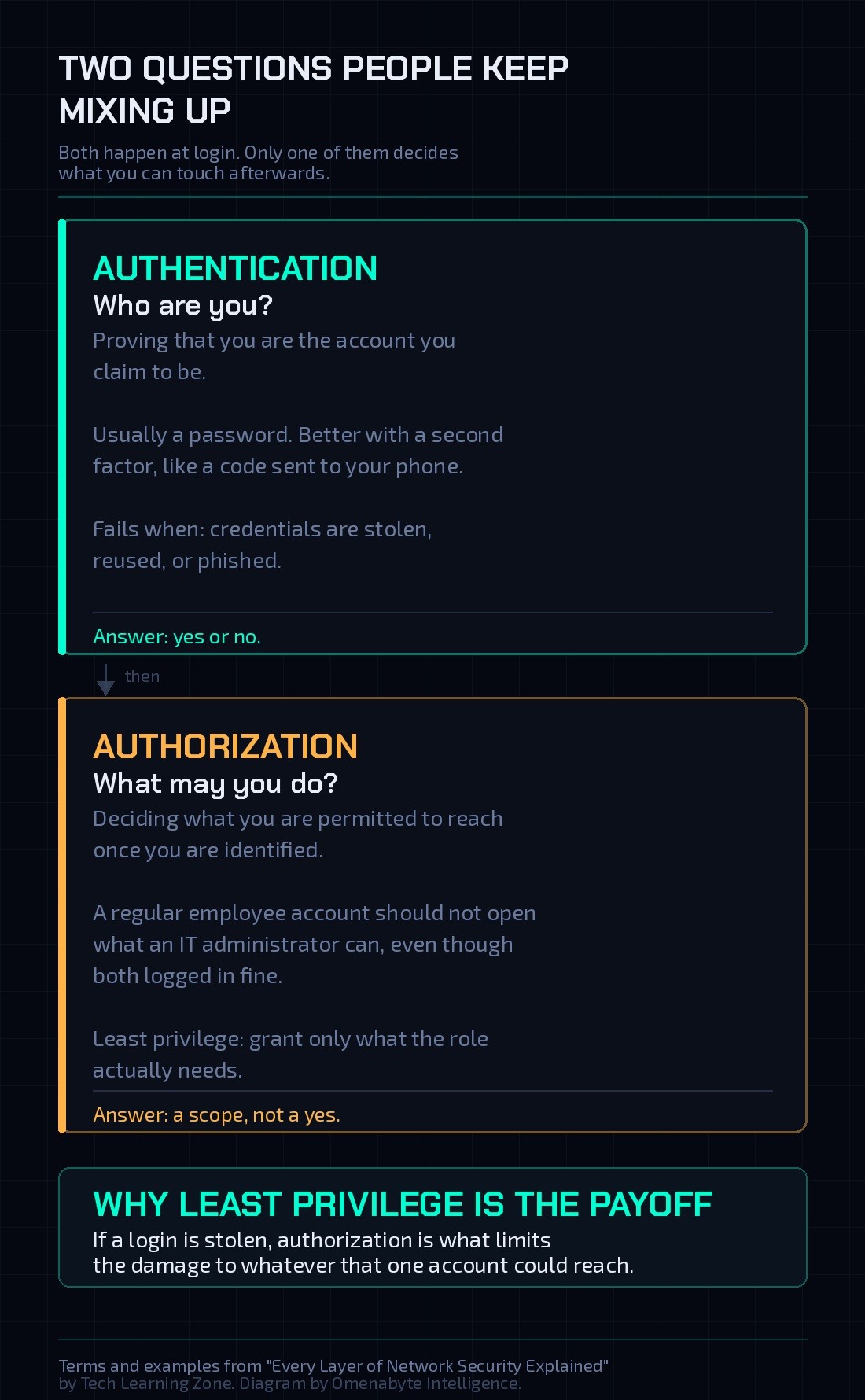
Two ideas live here, and this is the pair people mix up most.
Authentication asks who you are. Proving identity, usually with a password, ideally backed by a second factor like a code on your phone.
Authorization asks what you may do. A regular employee account shouldn't open the same systems an IT administrator can, even though both logged in successfully.
That gap is where least privilege comes from. Give people access to only what they actually need, nothing more. If someone does steal a login, least privilege limits the damage to whatever that one account could touch. Even inside a segmented zone, with valid-looking credentials, something is still deciding what's reachable.
Layer 5: Endpoint security
Everything so far has been the network. But there's still a device sitting at the end of it, and that device needs its own armour.
Antivirus, host-based firewalls, system updates, plus detection tools that watch for suspicious behaviour. Here's the uncomfortable part. A perfectly secured network can be completely compromised through one infected laptop. Someone downloads a malicious attachment or plugs in a stray USB drive. The threat isn't trying to break down the front door anymore. It's already inside, running code on a device that was allowed to be there all along.
That's why the endpoint is a primary target rather than a passive tool sitting safely behind the network's defences.
Layer 6: Application security
Protecting the device isn't the end of it either, because the software on that device can have flaws of its own.
A login form that doesn't check its inputs. Software that hasn't been patched. A bug that lets someone bypass a permission check entirely. The network is fine, the device is fine, and the application is the way in.
The controls are secure coding, vulnerability testing before attackers get there, authentication built into the application, input validation that doesn't trust what users type, and in some cases a web application firewall filtering traffic aimed at the app rather than the network.
The distinction worth holding on to is this. Network security protects the path data travels on. Application security protects the software using that path. You can lock down every road into a city and still have a building with a broken door.
Layer 7: Data security
Every layer so far was about stopping an attacker getting closer. This one matters if all of them fail, because this is the thing they were actually after.
Encryption in transit protects data while it moves, so an interception yields something unreadable without the key. Encryption at rest protects it while it sits on a server doing nothing. Access controls decide who can open it. Backups mean that if data is deleted, corrupted, or held for ransom, a copy exists elsewhere. Data classification sorts information by sensitivity so the most critical material gets the strictest handling.
Which leads to the reframe this layer buys you. Security isn't only about stopping someone getting in. It's also about making sure that if they do get in and walk away with something, it's useless to them. Encrypted data without the key is noise.
Layer 8: Monitoring and incident response
An attacker made it past everything. What now?
Logs record activity. Intrusion detection tools flag suspicious behaviour. SIEM platforms pull all of it into one place and look for patterns a human would never catch on their own. A login from a country the employee has never visited. A server suddenly shipping gigabytes outbound at 3am.
When something trips, incident response takes over. Detect the threat. Investigate what actually happened. Contain it before it spreads. Then recover, restoring systems, patching whatever let the attacker in, and learning from it. That four-step shape is standard practice rather than improvisation; it appears in NIST SP 800-61 and in every serious incident-response plan.
This layer is what makes the whole system honest. Layers 1 through 7 are prevention, all of them betting an attack can be stopped. Layer 8 accepts that prevention fails, and makes sure failure isn't the end of the story.

Where this model quietly breaks
Eight layers is a good map. Here's what it leaves out.
Attacks chain layers, they don't pick one
Phishing gets in through the application layer as a malicious link, executes as malware on the endpoint, performs ARP spoofing at the data link layer to intercept traffic, then moves sideways because the network was never segmented. Defence in depth works because the chain gets interrupted somewhere, not because each layer is individually perfect. Treating the layers as independent hides the part that actually matters.
Controls get pointed at the wrong layer
This is the most common engineering error. A firewall rule operates on IP addresses and ports, so it cannot stop SQL injection. Injection is an application-layer problem wearing a valid-looking HTTP request, well-formed traffic on an allowed port. Teams then conclude the firewall failed, when the firewall was never the right tool.
There's more than one thing called a firewall
Traditional firewalls work at OSI's network and transport layers, filtering by address and port. A web application firewall inspects HTTP content and is also called a firewall. Same word, different layer, different job. Assuming you have "the firewall" covered when you own one of the two is how Layer 6 stays open.
Encryption isn't one thing either
IPsec at OSI's network layer protects all traffic between two endpoints, transparently to applications. TLS protects one application's session. Same goal, different scope, and reaching for the wrong one is a classic layer mismatch.
Nobody implements all eight equally well
That's fine, and pretending otherwise is worse than admitting it. The useful exercise is knowing which layer you're weakest at. For most small teams, it isn't the perimeter.
The practical version
The skill worth taking away isn't memorising eight names. It's matching the control to the layer of the problem.
Network path problem, think firewall or segmentation. Admission problem, think network access control. Malicious traffic that needs blocking inline, think intrusion prevention. Endpoint behaviour after execution, think EDR. Sensitive data leaving through email or cloud sharing, think DLP. Injection or cross-site scripting in a web app, think input validation and a WAF.
Get the layer right and the tool choice mostly makes itself. Get it wrong and you'll spend money on the wrong control, then wonder why the problem is still there.
Which of those eight did you last actually look at? For most teams it's the firewall. For most teams the firewall was never the layer that was going to fail.
If you made it this far, you now know more about network security than most people who click "remind me later" on a software update.
Defence in depth
Find out which layer is actually open.
Penetration testing, red teaming, and security audits that map findings to the layer they belong to, so the fix goes to the right control instead of the most familiar one.
Source & credits
The eight-layer framing is from "Every Layer of Network Security Explained" by Tech Learning Zone. The material on chained attacks, misplaced controls, IPsec versus TLS scope, and the NIST SP 800-61 incident-response framing is added editorial context, not from that video. Photography from Wikimedia Commons under the licenses noted in each caption; both diagrams were drawn for this article.
Originally published on omenabyte.com → https://omenabyte.com/blog/every-layer-of-network-security